
How to Trade Crypto on Bitget Using Origami Tech

Introduction
If you trade on Bitget and want to automate your strategies, you can connect your exchange account to Origami Tech in just a few minutes.
In this guide, we will show you how to generate API credentials on Bitget, connect your account to Origami Tech, and start automating your trading activity.
Get your API key and passphrase on Bitget
Before connecting Bitget to Origami Tech, you need to generate API credentials on the exchange.
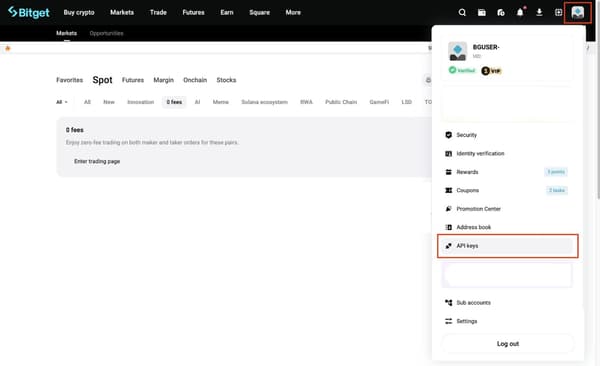
1. Visit the Bitget website and create an account or log in to your existing one. Click the profile icon in the upper-right corner and select API Key.
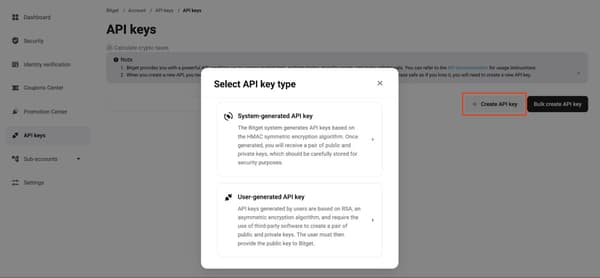
2. On the API keys page, click Create API key on the right side. A menu will appear where you can select the type of API key. Choose System-generated API key.
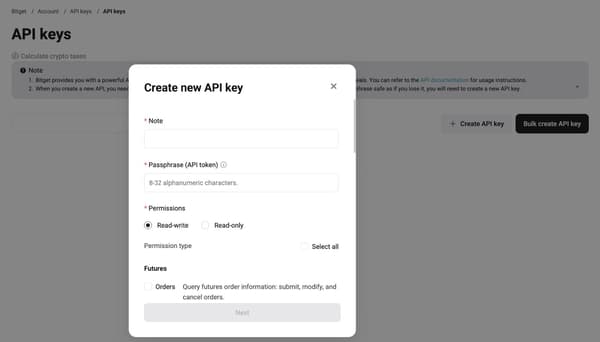
3. In the API key settings panel:
- Enter an API name
- Create a passphrase (this value is defined by you and cannot be recovered)
Then configure the required permissions.
For integration with Origami Tech, enable the following permissions:
- Read-only
- Trade
Do not enable Withdraw permissions.
4. Add the Origami Tech IP address 15.235.202.52 to the IP whitelist field. This allows Bitget to accept trading requests coming from Origami Tech.
5. Click Next to generate your API key, secret key, and passphrase. Save this information immediately. The secret key will only be displayed once.
Security tips
To keep your assets safe:
- Never share your API key, secret key, or passphrase with anyone
- Bitget support will never request these credentials
- Enable two-factor authentication (2FA) for additional protection
Origami Tech only requires trading permissions and does not request withdrawal access. Your funds remain on the exchange at all times.
For more details, you can also refer to Bitget’s official API documentation.
Bind your Bitget account to Origami Tech
Once you have generated your API credentials, you can connect Bitget to Origami Tech.
1. Go to the Origami Tech website. Click Start Trading in the middle of the Origami Tech page. You’ll be taken to the login screen.
Create your profile
- Select Sign Up to create a new account.
- Enter your email address and password, confirm your password, and enter your referral code (if applicable).
- Click Sign Up.
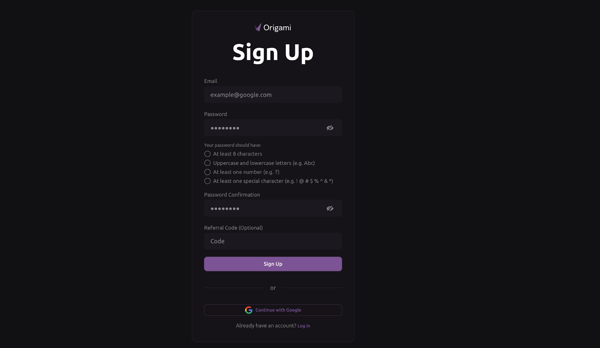
You can also sign up instantly using your Gmail account.
- Verify your account
- — Type in the verification code sent to your inbox.
- — Click Log In.
- Once you’re in, you’ll arrive at the Origami Tech platform, which is your main workspace for managing bots, tracking accounts, and monitoring your performance.
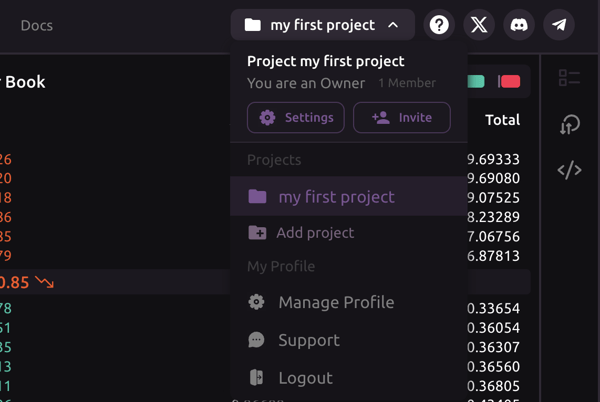
- Before you start live crypto trading, you’ll need to create your first project
- Create Project
- — Open the project menu.
- — Locate your profile icon in the top-left corner.
- — Click the profile icon to open a dropdown menu.
- — From the menu, select Add Project.
- Add accounts.
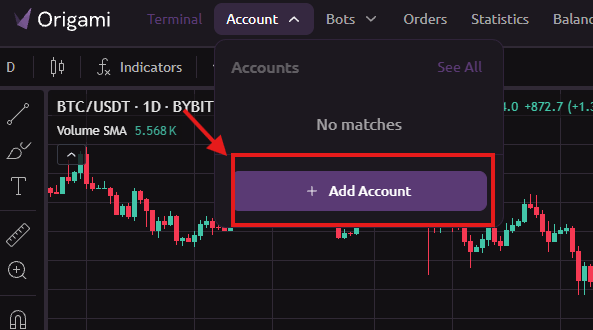
An account connects Origami Tech to your cryptocurrency exchange through API keys. It allows the platform to trade on your behalf and keep track of your positions.To connect your exchange account to the profile:- Go to Account in the upper menu bar and select Add Account.
- From the list of supported exchanges, select Bitget. A form will appear asking for your API credentials.
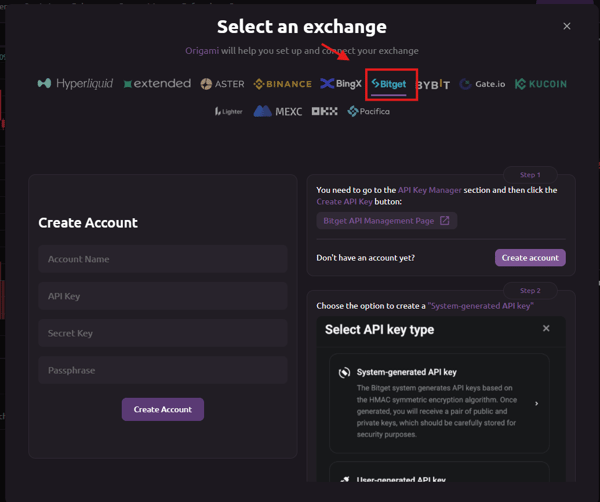
- Enter the following details:
- API Key
- Secret Key
- Passphrase
These are the credentials you generated earlier on Bitget when creating your API key. Make sure you enter them exactly as provided.
— Before completing the connection, verify that the API key on Bitget has the correct settings.
— Add a Note to identify the key (for example: Origami Tech Bot) and create a Passphrase that you will remember, as it will be required when connecting the account.
Enable Read-write permission and select the following access scopes:
Futures
- Orders
- Holdings
Spot
- Trade
Margin
- Trade
Wallet
- Transfer
Bind the following IP address to your API key:
15.235.202.52
— After configuring these permissions, complete the Security Verification required by Bitget.
It is important to make sure that the IP address 15.235.202.52 is included in your exchange’s IP whitelist. Depending on the exchange interface, the whitelist step may appear later in the API creation process. If the IP address is not added, Origami Tech will not be able to connect to your Bitget account.
Once the API credentials are entered correctly, click Add Account to complete the connection. Your Bitget account will now appear in the Accounts tab, where you can view balances and start setting up automated trading bots.
Create your first trading bot on Origami Tech
Once your Bitget account is connected, you can create your first automated trading bot on Origami Tech.
A trading bot continuously monitors market data from the exchange and automatically places orders based on the strategy you configure.
Step 1. Open the Bots section
— In the top navigation bar of the Origami Tech platform, click Bots.
— Then click Add Bot to start creating a new bot.
Step 2. Configure basic bot settings
You will see a form where you need to enter the basic parameters of your trading bot.
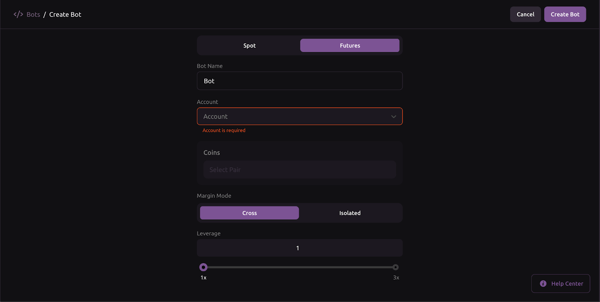
— Fill in the following fields:
Bot Name
Choose a name for your bot, for example Grid Bot or BTC Strategy.
Account
Select the Bitget account you connected earlier.
Trading Pair
Choose the pair you want the bot to trade, for example BTC/USDT.
— After entering the required information, click Next.
Step 3. Create a trading strategy
At this stage, you define the logic that determines when the bot will place orders.
Origami Tech allows you to create trading strategies using formulas and conditions without writing code, giving you full control over how your bot executes trades.
Import a preset strategy
If you want to get started quickly, you can use a preset strategy.
— Click Import Preset, choose one of the available presets, and import it into your bot configuration.

— Choose a preset from the pop-up window.
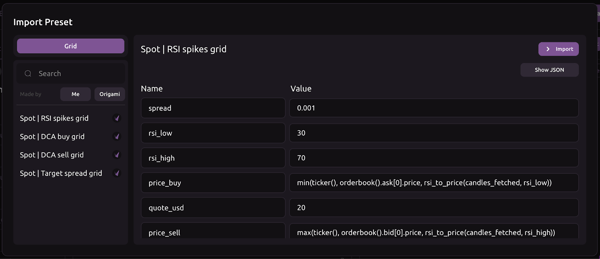
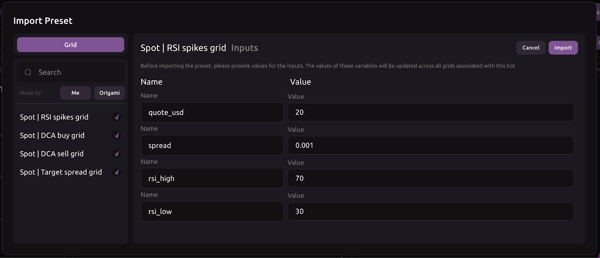
— Click Import to load the configuration.
The preset values fill the bot input form automatically. Modify them if needed, then click Import once again to finalize.
— Activate your bot and start receiving data: navigate to the Bots tab.
— Find your newly created bot.
— Click the power icon to switch the bot on.
Your bot is now active and receiving live data.
Why trade on Bitget with Origami Tech
Bitget is one of the major global cryptocurrency exchanges launched in 2018, serving tens of millions of users across more than 100 countries and processing billions of dollars in daily trading volume. The platform offers spot, margin, and futures markets, supports hundreds of cryptocurrencies and trading pairs, and is known for competitive trading fees and strong liquidity on major assets.
Combined with Origami Tech automation tools, Bitget becomes a convenient environment for both beginners and experienced traders: you can connect your exchange account, deploy automated bots, and manage strategies from a single dashboard while your funds remain securely stored on the exchange.
If you want to explore more advanced setups or configure bots manually, refer to the detailed guides in the Origami Tech documentation.
You may also like




Trade Smarter with Origami Tech
Take your crypto trading to the next level with our powerful automated trading terminal. Maximize profits, minimize risks, and stay ahead of the market 24/7.