

How to Trade HyperLiquid Futures with Origami Tech. Part 2

Introduction
This is the second part of our HyperLiquid trading guide, designed for advanced users. Here we go beyond the basics and walk you through creating a fully automated trading bot with custom grids. You’ll learn how to structure strategies step by step, fine-tune execution logic, and unlock the full flexibility Origami Tech offers for HyperLiquid futures trading.
Part 2. Advanced Setup with Custom Grids
As for connecting your wallet, generating API keys, and linking your account to Origami Tech, we covered all of that in the First Part of this guide.
Now let’s move on to the advanced setup, where we’ll build a trading bot step by step using custom grids.
Bot initial set-up:
- Go to the Bots page in Origami Tech.
- Click the Add Bot button.
- In the initial settings, select:
- Exchange — choose HyperLiquid Futures.
- Account — pick the account you connected earlier.
- Trading Pair — select the pair you want to trade (for example, HYPE-USD)
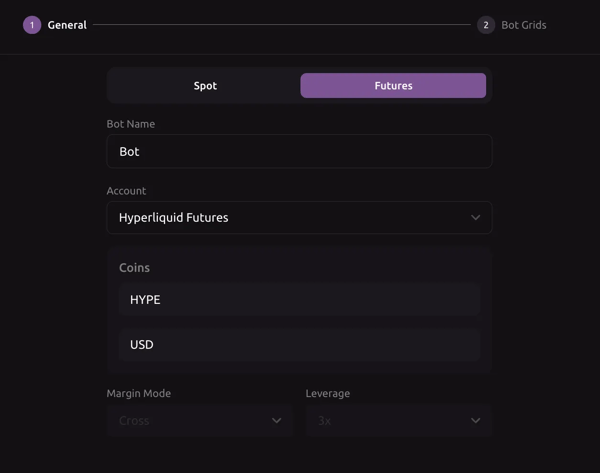
- 4. After confirming these settings, you will be redirected to the grid setup page.
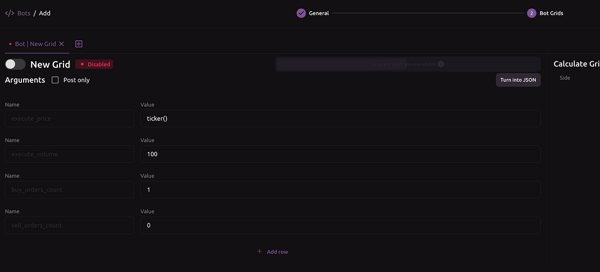
Note: In Origami Tech, Grid is a small bot inside the main bot itself, which allows you to split general strategy into smaller pieces in order to ease the process of working with the bot itself.
- Strategy and grids:
- For the suggested strategy, we will need 3 different Grids in our bot:
Grid for opening the initial position:
{
"execute_price": "(price_low if side == 'buy' else price_high) (1 + spread order_pos)",
"execute_volume": "11 / execute_price",
"buy_orders_count": "1 if position_bot.available_quantity == 0 else 0",
"sell_orders_count": "1 if position_bot.available_quantity == 0 else 0",
"AAA": "'start_position",
"spread": "0.0002",
"price_low": "candles_1m[0].low",
"candles_1m": "candles_futures('m1')",
"price_high": "candles_1m[0].high",
"position_bot": "position(position_side='one_way', margin_mode='cross')",
"sleep_after_seconds": "1"
}
Just copy the Grid above and paste it in your bot.
Grid for averaging our position:
{
"execute_price": "ticker_futures()",
"execute_volume": "11 / execute_price if Flag == 1 else 0",
"buy_orders_count": "1 if position_bot.available_quantity > 0 else 0",
"sell_orders_count": "1 if position_bot.available_quantity < 0 else 0",
"AAA": "'multiply_position",
"gap": "0.01",
"Flag": "1 if ((position_bot.available_quantity < 0 and ticker_futures() / position_bot.breakeven_price - 1 > gap) or (position_bot.available_quantity > 0 and position_bot.breakeven_price / ticker_futures() - 1 > gap)) else 0",
"price_buy": "min(position_bot.breakeven_price * (1 - profit), ticker_futures())",
"price_sell": "max(position_bot.breakeven_price * (1 + profit), ticker_futures())",
"position_bot": "position(position_side='one_way', margin_mode='cross')",
"time_between_orders": "60"
}
Just copy the Grid above and paste it in your bot.
Grid for closing our position:
{
"execute_price": "price_buy if side == 'buy' else price_sell",
"execute_volume": "min(max(abs(position(position_side='one_way', margin_mode='cross').available_quantity) * 0.1, 15 / ticker_futures()), abs(position(position_side='one_way', margin_mode='cross').available_quantity))",
"buy_orders_count": "1 if position_bot.available_quantity <= 0 else 0",
"sell_orders_count": "1 if position_bot.available_quantity >= 0 else 0",
"AAA": "'close_position",
"profit": "0.002",
"price_buy": "min(position_bot.avg_price * (1 - profit), orderbook_futures().ask[0].price)",
"price_sell": "max(position_bot.avg_price * (1 + profit), orderbook_futures().bid[0].price)",
"position_bot": "position(position_side='one_way', margin_mode='cross')"
}
Just copy the Grid above and paste it in your bot.
Running the Bot
- Make sure you have added all three grids to your bot separately.
- Go to the Bots page and start the bot by clicking the Power icon.
- Open the Statistics tab to track your bot’s performance in real time.
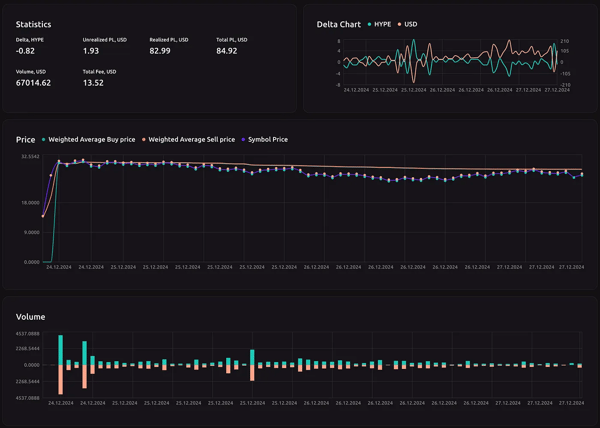
Unlocking the Full Potential of Origami Tech
With the advanced setup complete, your bot can now open, scale, and close positions automatically using custom grids. This is where Origami Tech truly shows its potential. You are no longer limited to fixed strategies but can design flexible logic that reacts to the market on your terms.
The grids you built are just the beginning. You can expand them with indicators, add conditions for risk management, or combine multiple bots within one project. Origami Tech gives you the freedom to experiment, test, and refine without compromise, turning trading ideas into working strategies in real time.
You may also like





Trade Smarter with Origami Tech
Take your crypto trading to the next level with our powerful automated trading terminal. Maximize profits, minimize risks, and stay ahead of the market 24/7.