
How to Join and Win a Crypto Trading Competition on Origami Tech

Introduction
Origami Tech regularly hosts crypto trading competitions in collaboration with top-tier blockchain projects and exchanges. These competitions are open to all Origami Tech users and offer prize pools ranging from tens of thousands to hundreds of thousands of tokens. Whether you're looking to showcase your strategy, stress test your trading setup, or simply earn rewards by doing what you already do through trading, competitions are a great way to engage with the market and the community.
Next, you'll find a clear, step-by-step walkthrough using MEXC as an example. While this guide focuses on MEXC, similar competitions may be hosted on other exchanges as well. The same process applies across all of them.
What is a Crypto Trading Competition?
A crypto trading competition is a time-limited event where participants trade selected pairs on supported exchanges. Origami Tech competitions usually last at least 7 days and are fully automated — participants connect their exchange accounts, launch bots, and let the platform handle execution. Prizes are typically distributed proportionally based on your trading volume compared to other participants. The more your bot trades, the larger your potential reward — it’s not about profit or loss, but pure crypto trading activity.
Why join? Three key reasons:
- Real rewards. Prize pools are funded by partners and paid in tokens. You keep what you earn.
- Live testing. By participating, you’ll be able to test your strategies in real market conditions.
- Passive execution. You don’t need to click through charts — your bot does the work while you focus on optimizing logic.

In this guide, we’ll walk through every step, including: creating your Origami Tech account, setting up your exchange connection, deploying a crypto trading bot, and monitoring your results. You’ll also learn key tactics that Origami Tech power users rely on to earn prizes consistently.
Step 1: Sign Up for Origami Tech
- Go to https://origami.tech
- Click the Start Now button
- On the login screen, click Sign Up
- Enter your email address and create a password
- Confirm your email by entering the code sent to your inbox
- Alternatively, you can sign up using your Google account
- Once logged in, you’ll be taken to the Origami Tech dashboard, where you can create projects and manage bots
Need help with registration or your first steps?
A more detailed walkthrough is available here:
Use Origami Tech to Automate and Manage All Your Crypto Exchange Accounts →
Step 2: Create a Project

- Click the profile icon in the top-right corner of the dashboard
- Select Add Project from the dropdown menu
- Enter a name for your project (e.g., "Trading Competition – April")
- Click Create
For a step-by-step project creation guide, please refer to the documentation.
Your project is now ready. Each project is an isolated space where your API keys, strategies, and bots will live.
Step 3: Set Up a Sub-Account on MEXC (or another supported exchange)
Origami Tech supports Bybit, KuCoin, MEXC, Gate, HTX and many others. For competitions, it’s highly recommended to trade via sub-accounts on your exchange. This keeps your main funds secure and gives your bots a clean, dedicated environment.
We’ll use MEXC for this example.
- Log in to your MEXC account
- Go to your Profile menu and select Sub Account Management

- Click Create a Sub Account
- Choose a unique username (minimum 8 characters, must include at least 1 number)

- Complete 2FA verification
- Your sub-account should now appear in your list
Step 4: Create an API Key for the Sub-Account
- Navigate to the API Management section in your MEXC account
- Click Create API, and select the sub-account you just created
- Enter a label like "Origami Trading Bot"
- Enable Read and Trade permissions (leave Withdrawals disabled)

- Enter the static IP address provided by Origami Tech (available during setup)

- Complete 2FA to finalize the key creation
- Copy your Access Key and Secret Key — you’ll use them to connect to Origami Tech
Step 5: Connect Your Exchange to Origami Tech
- Return to your project in Origami Tech
- Click Manage Profile, then go to the Accounts tab
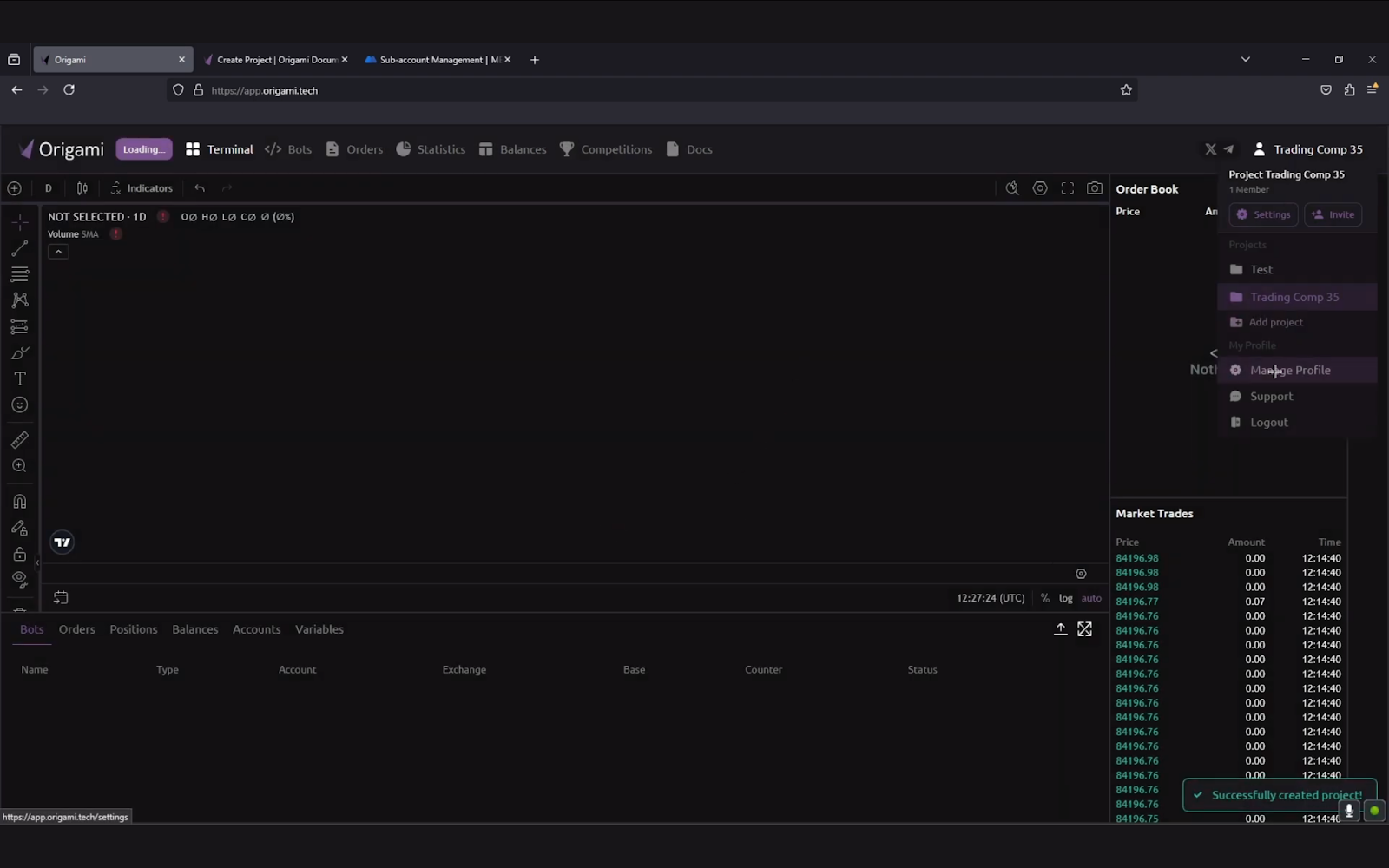
- Click Account

- Click Add Account

- Paste your Access Key and Secret Key into the appropriate fields

- Click Add Account
- Once connected, Origami Tech will display your sub-account balance
Make sure your trading funds (typically USDT) are in the Spot wallet of your sub-account.
Step 6: Create and Launch Your Crypto Trading Bot
- Go to the Bots tab from the top menu
- Click Add Bot
- Enter a name (e.g., “Trading Comp – XYRO”)
- Choose the account you just connected
- Select the competition trading pair (e.g., XYRO/USDT or EVER/USDT)

- Click Next
To configure the strategy:
- Click Import Preset
- Select Trading Competition Bot from the list

- Click Import, then confirm by clicking Import again
To preview your setup:
- Click the Research button to simulate what orders would be placed
- Review the results, then click Save and Exit

To activate:
- Find your bot in the list and click the power icon to turn it on

- Your bot is now trading automatically and participating in the competition
Prefer a video walkthrough?
We’ve published a step-by-step tutorial on YouTube that shows exactly how to join a competition, connect your exchange, and launch your bot:
What to Expect from a Competition
Once you join a competition, you’ll get access to a live dashboard with everything in one place:
- Leaderboard: updated in real time to show your rank and crypto trading volume
- My Bots: manage the bots you're running for the competition
- Statistics: track your trade counts, PnL, volume, and performance by pair
- Accounts: review or edit your connected exchange APIs
The interface is designed to keep you focused on the competition instead of juggling multiple tabs or spreadsheets.
Strategy Tips: How to Win a Competition
Origami Tech trading competitions aren’t just about launching a bot — they reward intelligent strategies, risk management, and the smart use of platform tools.
Here are three battle-tested tips from the Origami Tech team:
1. Distribute Your Risks
Limit your exposure by crypto trading across 3–5 instruments. This helps avoid over-concentration on one asset. Use different exchanges to reduce the chance of technical issues disrupting your trades. Consider diversifying across market types — spot and futures — to gain more execution flexibility.
2. Choose the Right Markets
Not all trading pairs are created equal. Look for pairs with strong liquidity and low slippage. Pay attention to underpriced assets that have high reward potential. Optimize your entries: lower volatility often means less risk of getting caught in extreme swings. If you have access to competitive fee tiers, use that as an advantage.
3. Use Origami Tech’s Tools
Leverage Origami Tech’s DCA-buy and DCA-sell presets for more stable, algorithmic execution. Track your stats live inside the platform to see how your bots are performing. Use Origami Tech’s formula editor to fine-tune your logic or test different variables and conditions. Adjust your timeframes and parameters throughout the competition — everything is editable mid-run.
4. Focus on Volume-Efficient Strategies
Since prizes are distributed based on trading volume, your goal isn’t just profit — it’s generating consistent, high-volume trades without reckless exposure.
- Use tight grid spacing with smaller trade sizes to increase trade count
- Prioritize assets with low trading fees and minimal slippage
- Don’t chase volatility; a stable, high-frequency bot often outperforms erratic trend-chasers
Origami Tech’s platform handles rapid recalculations and executions efficiently — use that to your advantage.
5. Start Early, Adapt Fast
Most of the top-performing bots in past competitions were launched within the first hour of the start. Launch early, gather stats, and adapt your grids in real time.
- Use the “Research” function regularly to fine-tune pricing
- Monitor your unrealized PnL and trade count in the Statistics tab
- React to market changes, don’t set-and-forget
Remember: you can edit live bots on Origami Tech — this gives you real mid-competition flexibility.
6. Use the “Research” Button to Validate Your Strategy
Before activating your bot, use Origami Tech’s “Research” button — it’s built right into the grid editor. This feature calculates your strategy and shows you exactly what orders would be placed based on your current formula setup and live market conditions.
Using “Research” lets you fine-tune without risk, especially when working with custom variables, conditions, or imported presets.
7. Treat the Bot Like a Team Member — Not a Set-and-Forget Script
Most users who lose in competitions simply turn on a preset bot and walk away. But Origami Tech is powerful because it gives you control.
- Set clear goals: volume vs. profit vs. positioning
- Schedule check-ins: analyze your performance every few hours
- Rotate pairs or adjust position sizes based on how the leaderboard is shifting
The best bots win because they’re managed, not ignored.
Need Help?
If you have any questions, the Origami Tech team is ready to help:
- Telegram updates: https://t.me/origami_tech
- Twitter updates: https://x.com/origamitech_
Ready to Compete with Confidence?
Trading competitions on Origami Tech are a high-impact way to grow as a trader, earn real rewards, and sharpen your automation skills. By combining a secure platform with flexible strategy tools, Origami Tech empowers you to compete like a pro — even if you’re new to automated trading.
Join the competition Origami Grid League: Win Your Share of 1,000,000 $DVO here: https://app.origami.tech/competitions/36
*This article is for informational purposes only and does not guarantee performance or profits when using any crypto trading bot or automated strategy on Origami Tech.
You may also like






Trade Smarter with Origami Tech
Take your crypto trading to the next level with our powerful automated trading terminal. Maximize profits, minimize risks, and stay ahead of the market 24/7.